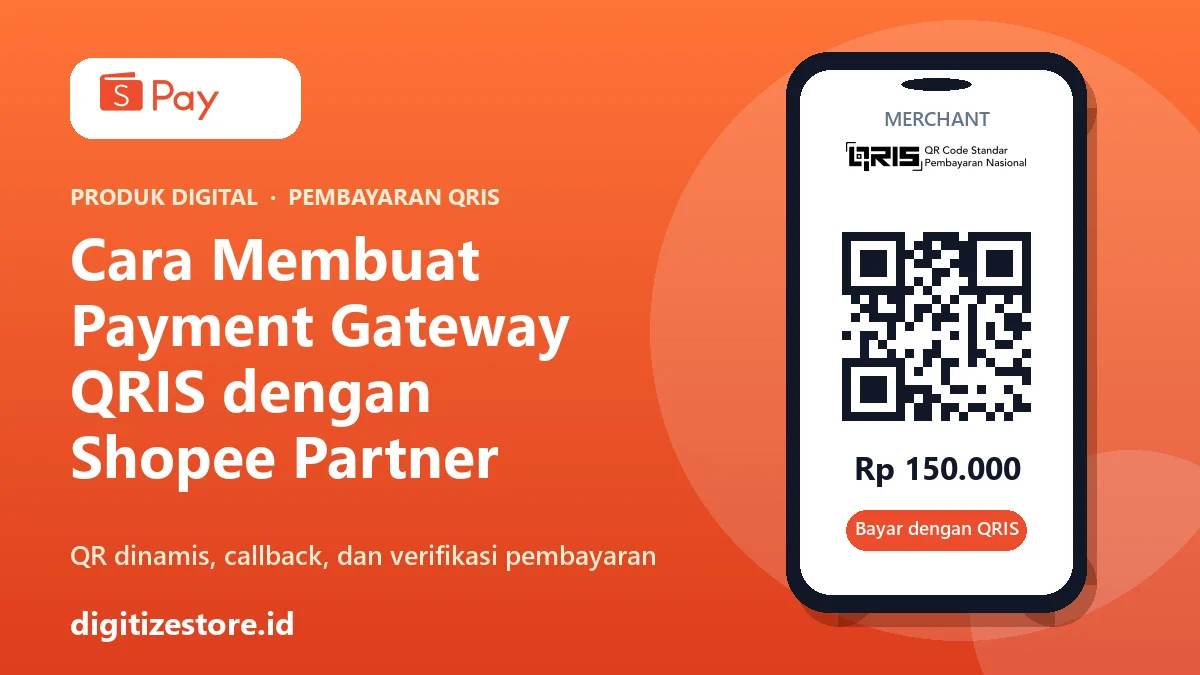
Many online store owners want to receive automatic QRIS payments without having to check each transaction individually. Shopee Partner is a name that comes up often, so it’s only natural that people search for “how to set up a Shopee Partner QRIS payment gateway.” There’s one thing that needs to be clarified from the start: Shopee Partner is an app for registering and managing merchants—it’s not an API that you can call from a website. To build your own payment gateway, you’ll need the ShopeePay API or an official gateway provider that’s already integrated with QRIS.
This guide explains the differences, outlines three realistic approaches, and then discusses the technical workflow for ShopeePay’s dynamic QR codes—from generating the QR code to verifying payment notifications.
Shopee Partner, ShopeePay API, and QRIS: What’s the Difference?
These three terms are often confused:
- QRIS is the national payment QR code standard. A single code can be paid via many e-wallets and mobile banking apps.
- Shopee Partner is a merchant app. Through it, business owners register as merchants and accept QRIS payments. This is a sales channel, not a programming interface.
- ShopeePay API is the official interface your system uses to generate QR codes, receive notifications, and check transaction status. The documentation is available on the ShopeePay developer portal.
So, if your goal is for the checkout page to automatically update to “Paid,” Shopee Partner alone isn’t enough. You’ll need to integrate via the API.
Three ways to automate QRIS payments
| Method | Suitable for | Notes |
|---|---|---|
| Payment gateway aggregators (Midtrans, Faspay, DOKU, and similar services) | Stores that want to go live quickly | One integration, multiple payment methods. Transaction fees apply. |
| Direct ShopeePay API | Businesses with high volume and a technical team | Requires a commercial agreement and signing of an NDA with ShopeePay. |
| QRIS + notification verification | Small businesses with a single QRIS merchant | Simple, but only semi-automated and more prone to mismatches. |
For most stores, the aggregator route is the most practical and secure. A direct connection to ShopeePay makes sense if you already have a team ready to manage the integration.
Preparations before direct integration
According to ShopeePay’s Get Started page, the process begins by contacting the ShopeePay team for an NDA and commercial agreement, selecting the integration type (In-Person or Online Payments), and then receiving credentials for testing. What you’ll need to prepare:
- Client ID and Client Secret from ShopeePay.
- ShopeePay’s public key to verify the callback.
- Your own 2048-bit RSA private key, and its corresponding public key sent to ShopeePay.
- A callback URL in the form of an HTTPS address on your server.
- A server with TLS 1.2 or 1.3.
The secret key must not be included in the code repository and must not be visible on the browser side. Store it in a server environment file, and restrict who can read it.
Dynamic QR Code Flow (Merchant Presented Mode)
In this mode, your store generates the QR code, and the buyer scans it using any app that supports QRIS.
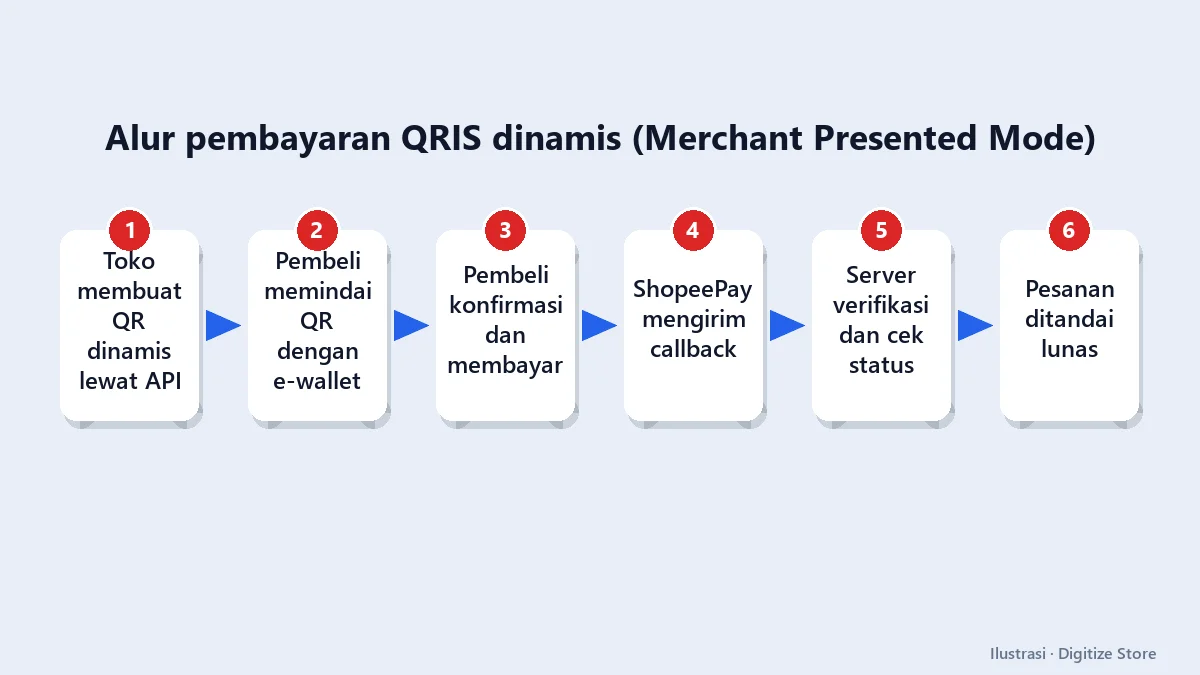
The sequence is:
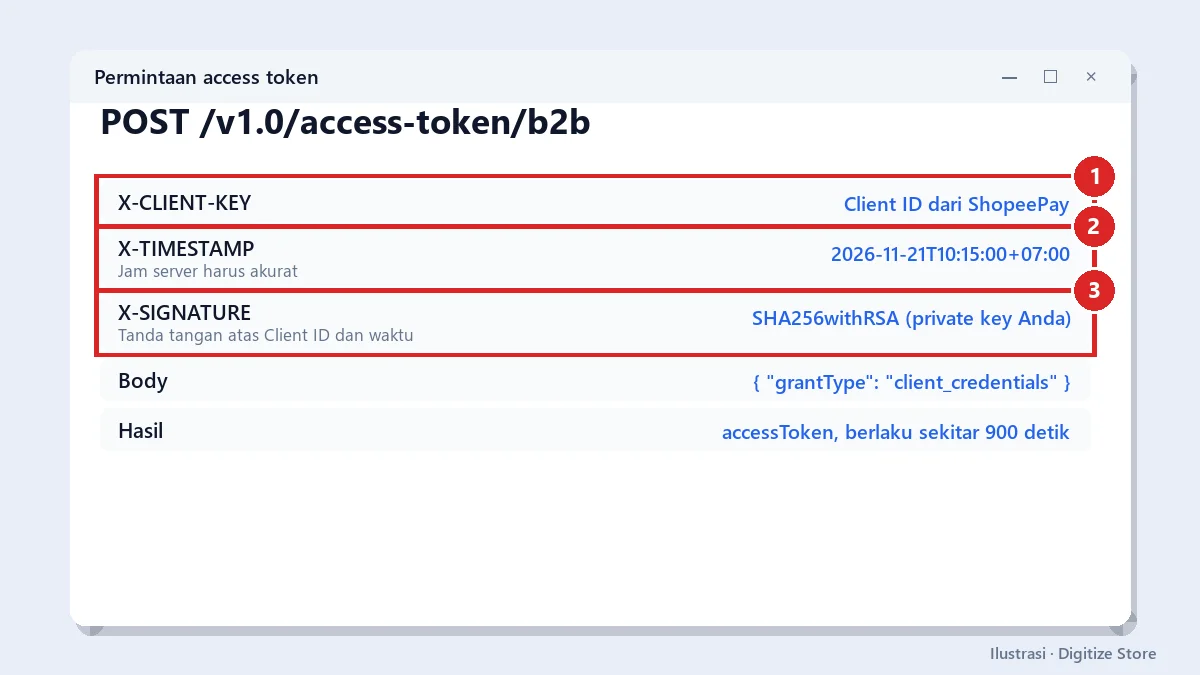
- Request an access token.
Call the access token endpoint with an RSA signature (SHA256withRSA) based on the client ID and timestamp. The token is valid for about 15 minutes, so store it temporarily and renew it before it expires.
- Generate a QR code. Send a request to the endpoint
qr-mpm-generatecontaining the order reference number from your system, the amount, the currency (IDR), the merchant ID, and the store ID. Each transaction request is signed with HMAC-SHA512. - Display the QR code on the payment page, complete with a validity countdown. The default is 20 minutes, and the QR image link from ShopeePay is only valid for 5 minutes, so download or render the QR code content yourself.
- Receive the callback. When the buyer pays, ShopeePay calls your Callback URL.
- Confirm the status via the endpoint
qr-mpm-querybefore marking the order as paid.
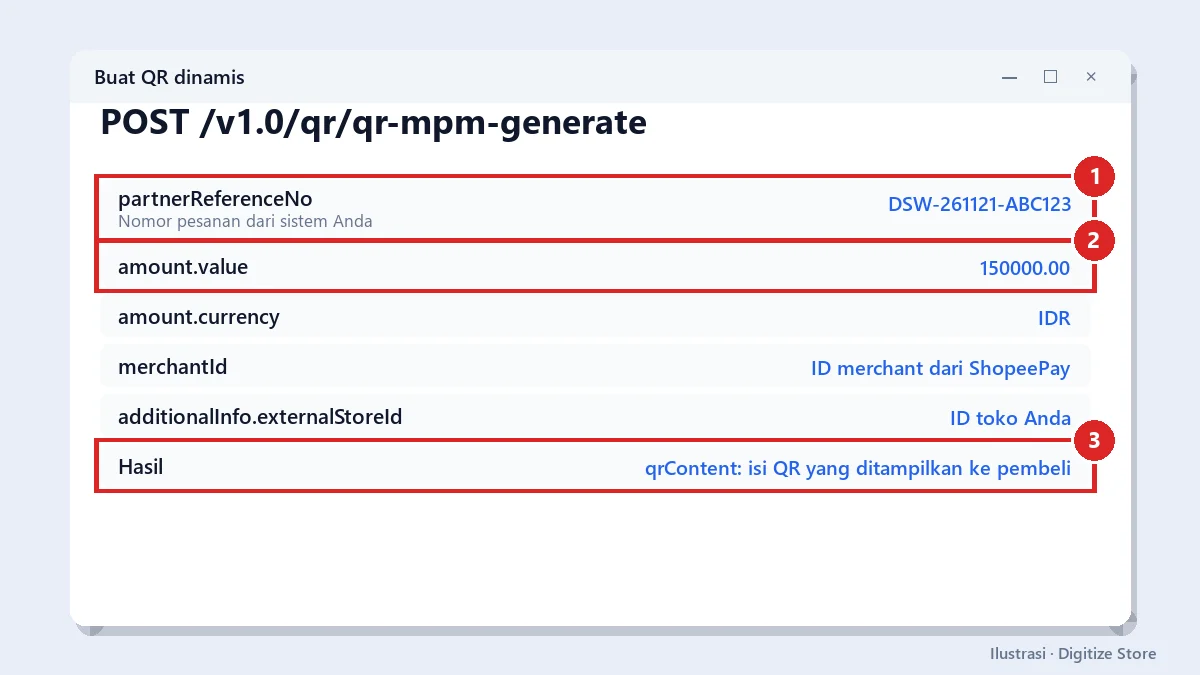
The request structure for the QR code looks something like this (values are just examples):
{
  "partnerReferenceNo": "DSW-261121-ABC123",
  "amount": { "value": "150000.00", "currency": "IDR" },
  "merchantId": "ID-MERCHANT-ANDA",
  "additionalInfo": { "externalStoreId": "ID-TOKO-ANDA" }
}
Use your own order number as partnerReferenceNo. This number will be matched when the callback is received.
Handling callbacks securely
This is where mistakes are most commonly made. Callbacks come from the open internet, so anyone can impersonate ShopeePay. Treat every callback as potentially untrustworthy data, and follow this sequence:
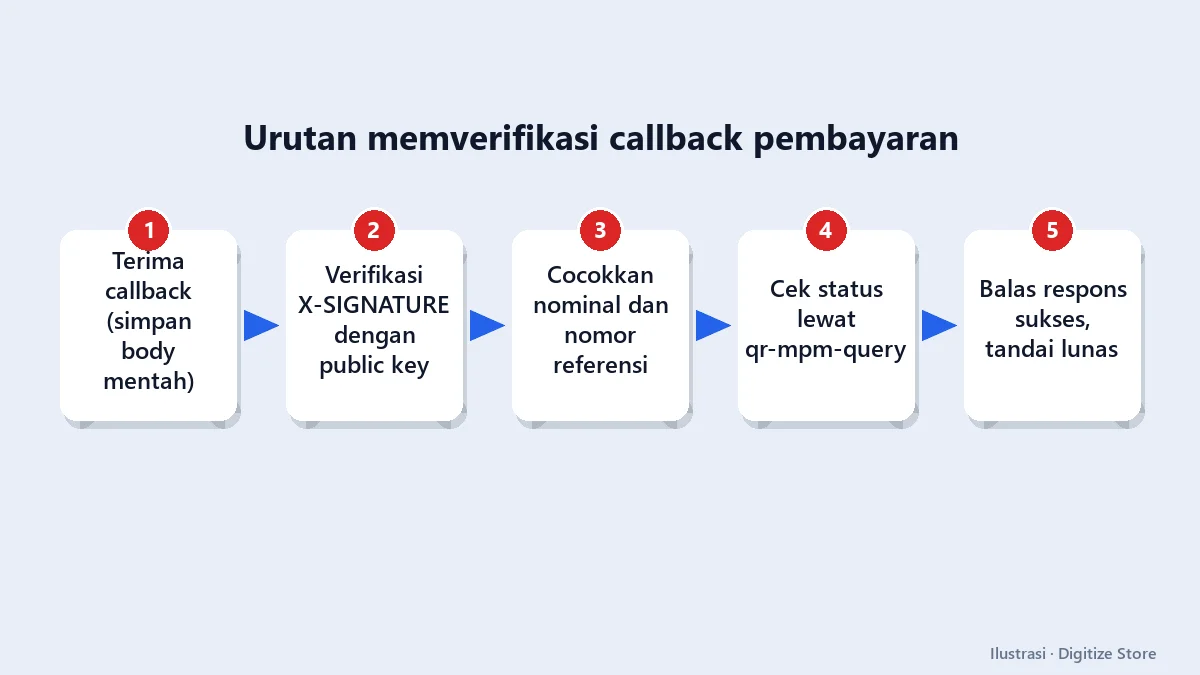
- Verify the signature (the header
X-SIGNATURE) using ShopeePay’s public key. Calculate the signature from the raw body content without modification, not from the re-parsed JSON. - Match the amount and reference number with the original order in your database. Do not simply trust the amount from the callback body.
- Check the status with ShopeePay via the query endpoint. The documentation recommends retrieving the final status from this endpoint.
- Make the process idempotent. If the same callback is received twice, the order must not be processed twice.
- Return a success response only after all checks have passed.
Important note from the documentation: the callback is sent only once without automatic repetition. Therefore, also implement periodic checks. ShopeePay recommends polling the status every few seconds initially, then every 5 minutes until the QR code expires. This ensures the order remains paid even if the callback fails to arrive.
Common mistakes to avoid
- Assuming payment is complete based solely on the “success” page in the browser. The buyer’s browser can be manipulated. The decision that payment is complete must be server-to-server.
- Failure to verify the payment amount. A payment of Rp10,000 should not be allowed to settle an order of Rp150,000.
- Server time is out of sync. Signatures use timestamps, so a misaligned server time will cause the request to be rejected.
- Expired QR codes are still being paid. Cancel old QR codes via the cancellation endpoint before creating a new one for the same order.
- Test directly in production. Use a sandbox environment first with test credentials.
- Logs containing keys or customer data. Never log secrets, tokens, or full signatures.
A simpler alternative for small businesses
If your order volume is still low and you’re not yet ready for a commercial agreement, there’s a simple approach: display a QRIS with a unique amount per order, then match incoming payment notifications to that order. This method is useful for getting started, but it has limitations. It relies on the notification format from third parties, lacks official status from payment providers, and requires manual oversight when discrepancies arise. Once order volume increases, switch to an aggregator or official API integration.
Conclusion
Shopee Partner helps you register as a merchant, while the automated QRIS payment gateway is set up via the ShopeePay API or an official aggregator. For direct integration, the process is as follows: request a token, generate a dynamic QR code, receive a callback, verify the signature, match the amount and reference, and then confirm the status before marking the order as paid. The most critical factor isn’t the code itself, but rather the thoroughness of the verification process. Since endpoint details, fees, and onboarding requirements are subject to change, always check the latest documentation on the ShopeePay developer portal and contact their team before getting started.
Frequently Asked Questions
Does Shopee Partner have an API for payment gateways?
No. Shopee Partner is an app for registering and managing merchants. Program integration uses the ShopeePay API or goes through a payment gateway aggregator.
Do buyers need to have ShopeePay to pay?
Not always. QRIS is designed to accept payments from various e-wallets and mobile banking apps that support QRIS. Availability depends on the terms of the provider you’re using.
How long is a dynamic QR code valid?
According to ShopeePay’s documentation, the default is 20 minutes and can be set for a longer duration, while the QR image link is only valid for 5 minutes. There are inconsistencies in the validity period formats in the sample documents, so please confirm with ShopeePay.
What happens if the callback doesn’t arrive?
The callback is sent only once. Therefore, add periodic status checks so that orders can still be paid off without waiting for the callback.
Is it better to use an aggregator or the direct API?
For stores that want to go live quickly and don’t have a large technical team, an aggregator is usually more practical. A direct API is suitable for high-volume businesses that need full control.