When you type a website’s name into your browser, your device needs to look up the website’s IP address. This is the job of the DNS (Domain Name System), which acts like a phone book for the internet.
Why is DNS important?
- Website loading speed. A slow DNS causes a delay before the page starts loading.
- Reliability. If the DNS is having issues, the website may seem “unreachable” even though you’re connected to the internet.
- Filtering. Some DNS services provide content filters, which are useful for schools and families.
When does changing your DNS help?
- Websites frequently fail to load, but chat apps still work.
- You want to implement content filtering on a school or home network.
Changing your DNS won’t increase download speeds. Speed is still determined by your internet plan.
Examples of public DNS servers
- Cloudflare:
1.1.1.1and1.0.0.1 - Google:
8.8.8.8and8.8.4.4 - Cloudflare for Families (blocks malware and adult content):
1.1.1.3and1.0.0.3
How to change settings in Windows
Open Settings → Network & Internet → Wi-Fi/Ethernet → Hardware Properties, click Edit next to DNS server assignment, select Manual, enable IPv4, and then enter the DNS addresses.
How to change it on a router
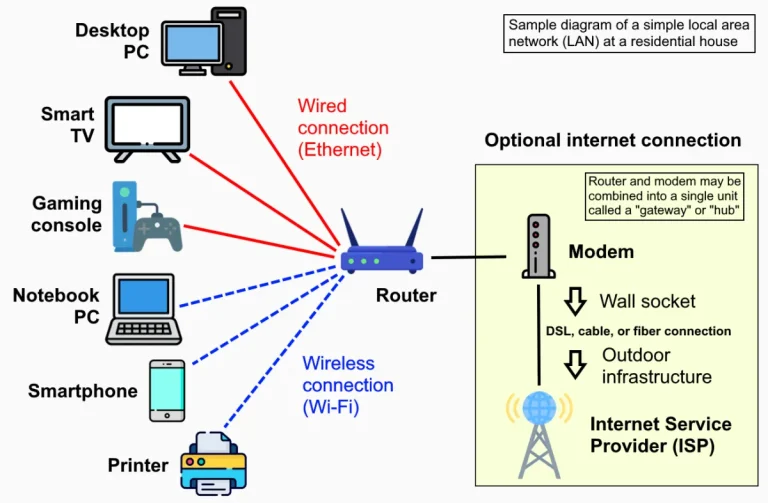
Changing the DNS on your router applies to all connected devices. On MikroTik, the settings are under IP → DNS. For hotspots, make sure the hotspot’s DNS name continues to function after the change.
Make a note of the old DNS settings before changing them, so you can easily revert to them.

The Digitize Store team: technicians and digital product makers helping you choose and use technology well.